Getting started with Licenseware SAM
Welcome to Licenseware SAM. This short, step-by-step guide makes compliance assessments easy. Everything fits on one page for a quick overview, but if you want more detail, just click any of the links throughout the page to dig deeper.
At a high level you will need to follow the steps below:
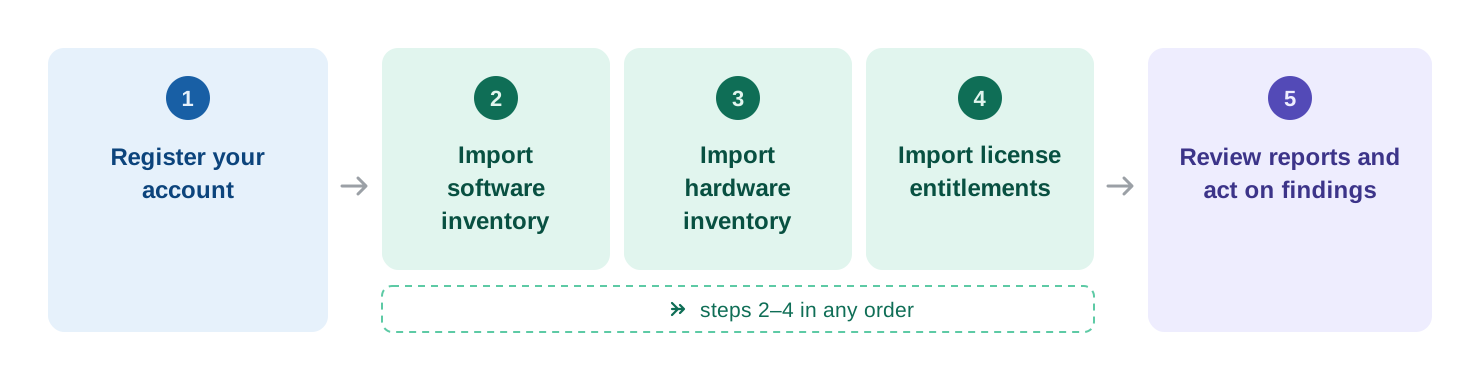
Register your account
Section titled “Register your account”To create a Licenseware account, visit the registration page for your preferred data region using one of the URLs below. Start by selecting the tenant where you want your data to be stored.
| Instance | Location |
|---|---|
| app.licenseware.io | Netherlands (Europe) |
| us.licenseware.io | Iowa (United States) |
| au.licenseware.io | Australia (APAC) |
For the full list of data sources that can be used to ingest data into Licenseware, see all supported data sources.
Import software inventory
Section titled “Import software inventory”Software inventory can be imported from a multitude of sources:
- Files — output generated by a script, a table exported in CSV, a text export from a tool, or a standardized report received from a vendor.
- API integration to a SAM tool or an admin portal for SaaS.
- Licenseware Collector and other scripts — in-house agent that requires install.
The complete list of supported data sources follows.
1. Files — exports, reports and templates
Section titled “1. Files — exports, reports and templates”Each data source feeds a specific Licenseware app — upload your data to the app matching the vendor you’re analyzing: ODBM for Oracle, MDM for Microsoft, ADM for Adobe, RDM for Red Hat, and SIM for general software inventory.
Exports and reports from existing tools
- Lansweeper CSV export — see the “Static Data” section — upload to SIM / MDM · ⿻ SW+HW
- Microsoft Intune — upload to SIM · ⿻ SW+HW
- Microsoft SCCM — upload to MDM · ⿻ SW+HW
See more data sources
- Microsoft MAP Toolkit — upload to MDM
- Microsoft 365 Admin Portal — upload to MDM
- Jamf Pro — upload to SIM
- CrowdStrike Falcon — upload to SIM
- RHEL Discovery — upload to RDM
- Snow License Manager — upload to MDM
- Flexera FNMS (Microsoft) — upload to MDM
- Flexera FNMS (Oracle / LMS DETAIL) — upload to ODBM / IFMP
- Flexera RHEL Installation Report — upload to RDM
- ServiceNow (Oracle DB) — upload to ODBM
- Proactivanet — upload to MDM
- NinjaOne — upload to SIM
- ManageEngine Endpoint Central — upload to SIM
- HCL BigFix — upload to SIM
- Device42 — upload to SIM
- PDQ Inventory — upload to SIM · ⿻ SW+HW
- Ivanti Neurons — upload to SIM
- Spiceworks — upload to SIM
- Tanium — upload to SIM · ⿻ SW+HW
- Qualys — upload to SIM
- Jira Service Management Discovery — upload to SIM
- HaloITSM — upload to SIM
Excel templates (fill in and upload)
- SIM Template — upload to SIM
- MDM Template — upload to MDM
- MEM Template — upload to MEM
- OEM Template — upload to OEM
- OJDM Template — upload to OJDM
- Visual Studio User Declaration — upload to MDM
2. API integrations
Section titled “2. API integrations”Each data source feeds a specific Licenseware app.
- Lansweeper API Integration — feeds SIM, MDM, OJDM and ADM · ⿻ SW+HW
- Microsoft Graph API — feeds MDM
- NinjaOne API — feeds SIM
See more data sources
- ServiceNow API — Microsoft, Infrastructure and Software Catalog — feeds MDM, IFMP
- Proactivanet API — feeds SIM
- ManageEngine Endpoint Central — API coming soon; CSV export available today
3. Collectors and collection scripts
Section titled “3. Collectors and collection scripts”When no inventory tool is available, run a collector or script directly on your hosts. The Licenseware Collector is a cross-platform agent (Windows, Linux, macOS, Docker); the vendor-specific scripts capture licensing-relevant details — Oracle DB options, Java installs, VMware topology — that generic exports miss. Each output file is then uploaded to its matching app.
- Licenseware Collector — cross-platform agent — feeds SIM, MDM, ODBM, OJDM, RDM and IFMP · ⿻ SW+HW
- Licenseware Collection Scripts (ODBM) — upload to ODBM
- Licenseware Collector for Red Hat — upload to RDM
See more data sources
- OJDM Collector (open source) — upload to OJDM
- JDowser (Java runtime scanner) — upload to OJDM
- Oracle LMS DB Collection scripts — upload to ODBM
- Oracle LMS Middleware Collection scripts — upload to OMWM
- Oracle Review Lite — upload to ODBM
- Oracle Options Pack Usage Statistics — upload to ODBM
Import hardware inventory
Section titled “Import hardware inventory”1. Files — exports, reports and templates
Section titled “1. Files — exports, reports and templates”Each data source feeds a specific Licenseware app — upload your data to the app matching the vendor you’re analyzing: ODBM for Oracle, MDM for Microsoft, RDM for Red Hat, and IFMP for infrastructure.
Exports and reports from existing tools
- Lansweeper CSV export — see the “Static Data” section — upload to SIM / MDM · ⿻ SW+HW
- Microsoft Intune — upload to SIM · ⿻ SW+HW
- Microsoft SCCM — upload to MDM · ⿻ SW+HW
See more data sources
- RVTools — Infrastructure — upload to MDM / IFMP
- RVTools — Red Hat — upload to RDM
- Microsoft MAP Toolkit — upload to MDM
- Snow All Device Details — upload to IFMP
- Flexera FNMS (Oracle / LMS DETAIL) — upload to IFMP
- PDQ Inventory — upload to SIM · ⿻ SW+HW
- Tanium — upload to SIM · ⿻ SW+HW
- IBM Hardware Management Console (HMC) — upload to IFMP
Excel templates (fill in and upload)
- IFMP Template — upload to IFMP
2. API integrations
Section titled “2. API integrations”Each data source feeds a specific Licenseware app.
- Lansweeper API Integration — feeds SIM, MDM, OJDM and ADM · ⿻ SW+HW
- ServiceNow API — Infrastructure — feeds IFMP
3. Collectors and collection scripts
Section titled “3. Collectors and collection scripts”When no inventory tool is available, run a collector or script directly on your hosts. The vendor-specific scripts capture licensing-relevant details — Oracle CPU topology, VMware host layout — that generic exports miss.
- Licenseware Collector — cross-platform agent — feeds SIM, MDM, ODBM, OJDM, RDM and IFMP · ⿻ SW+HW
- Oracle CPU Queries — upload to IFMP
- VMware PowerCLI script — upload to IFMP
Import license entitlements
Section titled “Import license entitlements”Entitlements define what you own — licenses, subscriptions, and contracts. Import them so your deployment data can be compared against purchases to produce a compliance position.
All entitlements land in the License and Contracts Manager (LCM) — the central app for recording licenses, contracts, and renewals (see the LCM documentation).
1. Templates
Section titled “1. Templates”- LCM Template — bulk upload of contracts and licenses — upload to LCM
- MEM Template — upload to MEM
- OEM Template — upload to OEM
2. Vendor-specific reports
Section titled “2. Vendor-specific reports”- VLSC (Volume Licensing Service Center) export — Microsoft — upload to MEM
- MLS (Microsoft License Statement) — request it from your Microsoft account team or reseller — upload to MEM
- Visual Studio User Declaration — subscriber list from the Visual Studio admin portal — upload to MDM
3. APIs
Section titled “3. APIs”- Microsoft Graph API — feeds MDM, with tenant-wide user, license and Microsoft 365 usage data